

You've downloaded 3,000 reviews from Olive Young (Korea's largest health and beauty retailer) into Excel. Nobody has time to read them, and the report is due next week. These days the first idea that comes to mind is dropping the whole thing into ChatGPT. And honestly, you get pretty usable answers. Whether you can copy those answers straight into a report, though, is a separate question.
The short version
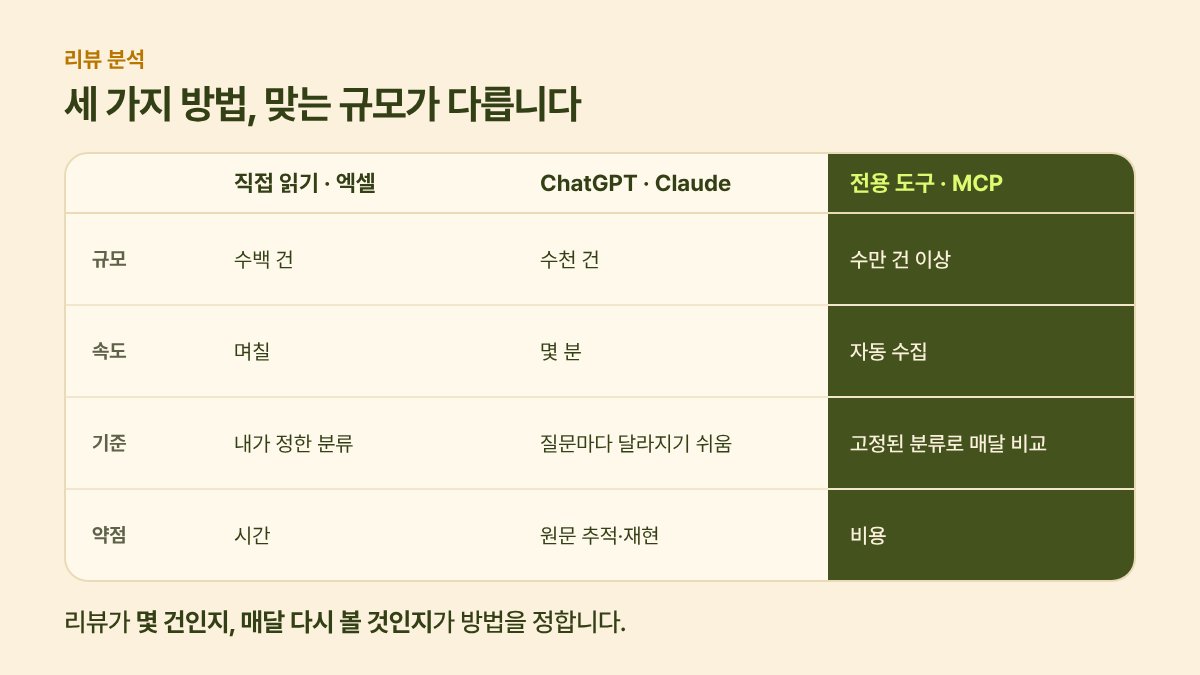
| Method | Right scale | When it works well |
|---|---|---|
| Read them yourself / Excel | Hundreds | When you're first building your classification criteria |
| ChatGPT / Claude | Thousands, once or twice | When you need a direction fast |
| Dedicated tool / MCP | Tens of thousands or more, every month | When you need to track change against the same criteria |
The two criteria are how many reviews you have and whether you'll revisit them every month. A few thousand reviews you'll look at once? ChatGPT is enough. Comparing against the same criteria every quarter? You need a tool.
1. Reading them yourself: the stage where you set the criteria
If it's a few hundred reviews, a human reading them is the most accurate. And whichever method you use, it's worth going through this stage once. Read 50–100 reviews and build a classification that fits your category, such as scent, feel, volume, price and packaging, and you can hand those same criteria to ChatGPT or a tool later. How to build the classification is covered in VOC analysis reports.
2. ChatGPT / Claude: fast, but it needs validation
Upload the review file, say "summarize the most common complaints," and you get a summary in minutes. There's research showing that on well-formed text like product reviews, generative AI's sentiment classification is on par with or better than conventional methods. In the same research, though, accuracy dropped on short, messy text like tweets and on three-way positive/neutral/negative classification (Krugmann & Hartmann, 2024). Syncly's blog cites this study, noting that GPT-3.5's three-way classification accuracy was 91.9 on product reviews versus 60.1 on Twitter (Syncly blog).
Three problems come up often when you do this with ChatGPT.
- The classification changes every time. Even with the same file, the way it groups things shifts with each question, which makes it hard to compare with next month.
- It's hard to trace back to the source. If you don't check which reviews back up a summary like "lots of complaints about volume," you can't answer when someone in the meeting asks, "How many is that?"
- It only sees what you put in. Short-form video reviews and reactions to competing products outside the reviews you downloaded never enter the analysis.
A prompt you can use right away
Fixing the classification criteria and requiring supporting quotes largely solves the first two problems.
Classify the attached reviews using only these attributes: scent, feel, effectiveness, volume, price, packaging, shipping, other.
If a single review covers multiple attributes, split it out by attribute.
For each attribute, give me a table with the number of positive mentions, the number of negative mentions, and 2 representative quotes (with review numbers).
Don't create new attributes; if something is ambiguous, put it under "other."
How to validate
Pick 100 of the results at random, classify them by hand, and count how often you agree with the AI. With 100, the margin of error is roughly ±10 percentage points; with 385, about ±5 points, so you can judge whether the number is fit for a report.
3. Dedicated tool / MCP: the stage where you keep watching
If you have tens of thousands of reviews, need to track change against the same criteria every month, or need to fold in short-form video reviews too, a dedicated tool is the right call. Collection is automatic, the classification criteria stay fixed, and you can jump from a summary straight back to the source. Recently, tools like Sometrend and Syncly have started connecting their data to ChatGPT and Claude via MCP, so you can ask conversationally while the answers stay grounded in the tool's data (see a rundown of Sometrend's MCP).
LG Electronics used aspect-based sentiment analysis to break reviews into units of meaning and see reactions by feature, and Syncly says initial setup time dropped 90% in the process (company-reported figure, Syncly blog).
When you don't need a tool
- You have a few hundred reviews from just one or two Korean channels
- You're early in planning and only need a direction this one time
- Your classification criteria aren't settled yet (start by reading them yourself)
Alpaca's takeaway
How you analyze reviews isn't a question of skill; it's a question of scale and repetition. This week, read 100 reviews yourself and build your classification criteria first, then hand the rest to ChatGPT with the prompt above. If you have to build the same table again next month, that's when it's time to look at a tool.
🦙 That's it for Researcher Alpaca's research notes. If anything is wrong or you have more questions, let me know through "Contact Josh" below. I'll fold it into the next round of research.
Related reading
- Sentiment analysis: what to check before you trust "82% positive"
- VOC analysis reports: how to write one that leads to decisions, with a template
Sources
- Krugmann & Hartmann, Sentiment Analysis in the Age of Generative AI (Customer Needs and Solutions, 2024) — generative AI sentiment analysis performance, differences by data type
- AI Sentiment Analysis Accuracy: What Vendors Disclose (Syncly blog, Oct 2026) — accuracy figures cited, sample validation criteria
- LG Electronics case study (Syncly blog, Jan 2025) — aspect-based sentiment analysis, setup time reduction (company-reported)


