
"Isn't there a site where I can see what's trending right now?" If you're a marketer, you've been asked this at least once. There are more answers than you'd think. The problem isn't that there are too many tools. It's that each tool answers a different question, yet people draw conclusions from a single number.
The short version
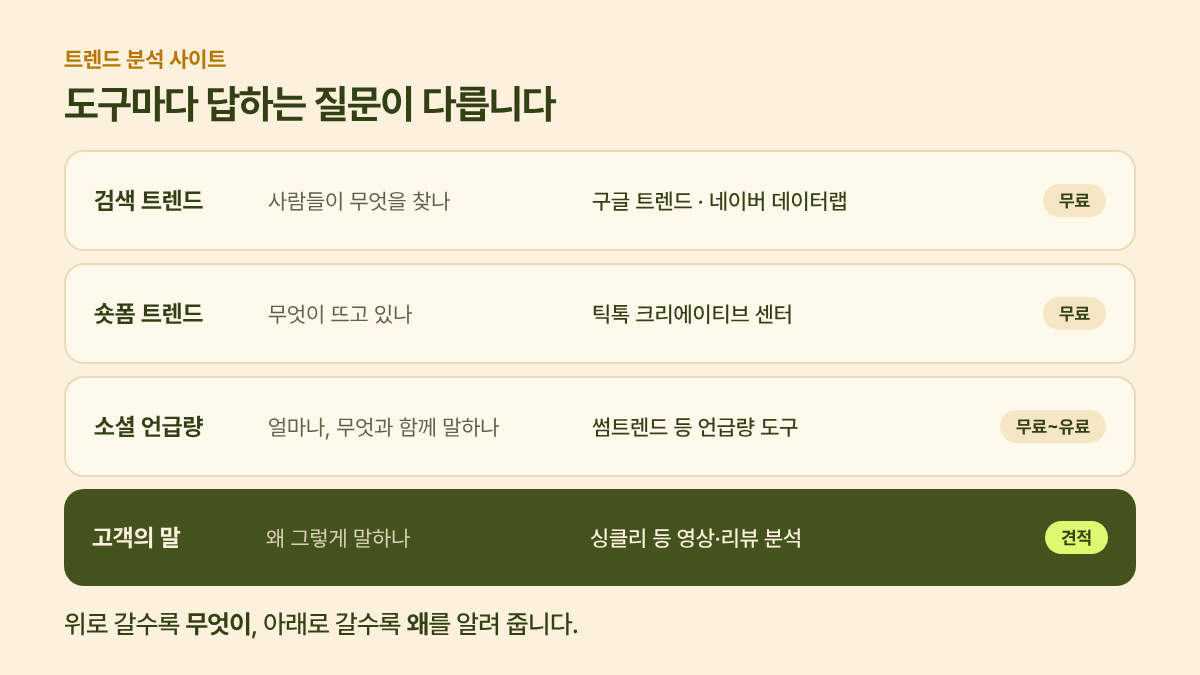
Trend analysis sites are easier to choose from if you sort them into four layers.
- Search trends: what people are looking for (Google Trends, NAVER DataLab)
- Short-form trends: what's taking off right now (TikTok Creative Center)
- Social mention volume: how much people talk about it, and alongside what (Sometrend and the like)
- Customer voice: why they say it (Syncly and other video/review analysis tools)
The upper layers are free and quickly tell you what. The lower layers take time and money but tell you why. If you're hunting for ideas, the top three are enough. If you're about to make a decision that costs money, like a product refresh or a new launch, you need to go all the way down to the bottom layer.
1. Search trends: Google Trends and NAVER DataLab
Google Trends shows interest in a search term over time and by region. The number isn't the actual search count. It's a relative value where the peak point in your selected period is set to 100. So you can't ask "how many searches is a 50?"; you use it for ups and downs and for comparisons. It's especially useful for checking interest by country before expanding overseas.
NAVER DataLab (from NAVER, Korea's largest search portal) is the first thing to open when you want to see search patterns in Korea. The search term trends feature lets you group related terms and compare up to five topics, and Shopping Insight breaks down click trends by category, split by device, gender and age group. For consumer goods in Korea, NAVER's patterns track actual purchases more closely than Google's.
- Good at: when interest rises and falls, which of your competing keywords is bigger
- Not good at: why people are searching, how they felt afterward
2. Short-form trends: TikTok Creative Center
The Trends menu in TikTok Creative Center shows trending hashtags, sounds, creators and videos by country and industry. It's good for checking whether a format is working right now before you plan ad creative or short-form content.
- Good at: the sounds, formats and hashtags trending now, and differences by country
- Not good at: how your brand is being talked about inside the videos. What you see is at the hashtag level, and a mention made only in speech, without a hashtag, isn't captured (see The limits of hashtag analysis).
3. Social mention volume: Sometrend
Sometrend shows how often a keyword is mentioned across blogs, communities and social media in Korea, which words appear alongside it, and whether reactions are positive or negative. Its strength is Korean data accumulated since 2008, and you can start free and scale up to a monthly subscription (Sometrend pricing).
- Good at: mention volume trends across Korean text channels, associated words, long-term comparisons
- Not good at: what's said inside short-form videos, or attribute-level praise and complaints within a single review. For overseas reactions, the Beauty MCP released in July 2026 extended coverage to Instagram and TikTok data from some 120 countries, but it's still limited to the beauty category (VentureSquare, Korean).
I covered the differences between Sometrend and Syncly separately in Sometrend vs. Syncly.
4. Customer voice: Syncly
From here on, we're looking at "why," not "how much." Syncly gathers the audio and visuals inside TikTok, Reels and Shorts videos, e-commerce reviews, and internal VOC like support conversations into one place, then breaks them down by attribute. For example, instead of stopping at "mentions went up," it goes down to "praise for the scent is unchanged, but complaints about the size grew compared with last quarter." Its website lists beauty and household goods brands and agencies in Korea and abroad as customers, and its Research Partners service says a dedicated consultant delivers a report together with the raw data (Syncly Research Partners, Korean).
- Good at: customer voice including mentions inside videos, prioritizing complaints by attribute, overseas reactions
- Not good at: a light, free look around. It's a quote-based service, so it doesn't fit the "let's just take a quick peek" stage.
What to open first, by situation
| Situation | Open first | Next step |
|---|---|---|
| I need content ideas | TikTok Creative Center | Check search demand in NAVER DataLab |
| I need to pick keywords for a new product | NAVER DataLab, Google Trends | Check associated words in Sometrend |
| I want to know how people react to our brand | Sometrend | If short-form is a big share, analyze the videos |
| I need to prioritize a product refresh or new product | Customer voice analysis (Syncly and the like) | Compare on the same basis every quarter using raw data |
| I'm choosing a country to expand into | Google Trends (by country) | Analyze customer reactions in short-form videos from that country |
Three common mistakes
- Reading relative values as absolute values. A 100 in Google Trends doesn't mean "a lot"; it means "the highest point in that period." You can only talk about size when you put keywords side by side.
- Assuming rising search volume means a positive reaction. Searches can also spike because something went wrong. If the number moved, open at least a few actual posts and reviews from that period.
- Mixing up the trend and your brand. A category taking off and your product being chosen are different questions. Use the upper tools for the first, the lower tools for the second.
Alpaca's takeaway
The criterion for choosing a trend analysis site isn't "which one is best" but which question I need to answer right now. This week, look at the flow with the three free tools at the top, and when that flow needs to turn into a decision, consider the bottom layer.
🦙 That's it for Researcher Alpaca's research notes. If anything is wrong or you have more questions, let me know through "Contact Josh" below. I'll fold it into the next round of research.
Related posts
- Sometrend vs. Syncly: which one fits your brand?
- The limits of hashtag analysis: what's said in videos goes uncaptured
Sources
- Google Trends — relative interest from 0 to 100
- NAVER DataLab — search term trends, Shopping Insight
- TikTok Creative Center Trends — hashtags, sounds, creators and videos by country and industry
- Sometrend plans — free and paid tiers
- Sometrend Us — data accumulated since 2008
- Syncly Research Partners — service scope, deliverables


